One-photo AI
Describe choices, then generate
Pick Person for one consenting adult, or Animal for a cat or dog. Upload one everyday photo. Then choose Auto or one of eight room ideas, select 480p or 720p and generate a new scene.
Workflow comparison · Updated October 22, 2026
Reviewed by Window Peeper AI editorial team
Choose Window Peeper AI when you want a new 14-second scene from one authorized photo. It accepts one consenting adult or one cat or dog. Choose the CapCut template when its current preview is already the fixed edit you want. This page compares that specific Window Peeper template with Window Peeper AI, not with CapCut’s full editor.
01 · Two workflows
One-photo AI
Pick Person for one consenting adult, or Animal for a cat or dog. Upload one everyday photo. Then choose Auto or one of eight room ideas, select 480p or 720p and generate a new scene.
CapCut template
Open the matching live template and verify the preview. Add media to its current slots, review the fixed edit and export through CapCut.
02 · Side by side
| Decision | AI generator | CapCut template |
|---|---|---|
| Starting input | 1 everyday photo of a consenting adult or a cat or dog | The current template’s required media slots |
| Subject choice | Person for an adult; Animal for a cat or dog | Defined by the selected template and supplied media |
| Room choice | Auto or 8 written room ideas | Background and edit are fixed by the template preview |
| Output | New 14-second 9:16 MP4 | Template-based vertical edit; details follow the live listing |
| Availability | Web-based workflow with cloud processing | Can vary by account, device and region |
| Best for | A newly generated remix from one photo | Reusing the exact available CapCut edit |
03 · Real input-to-output evidence
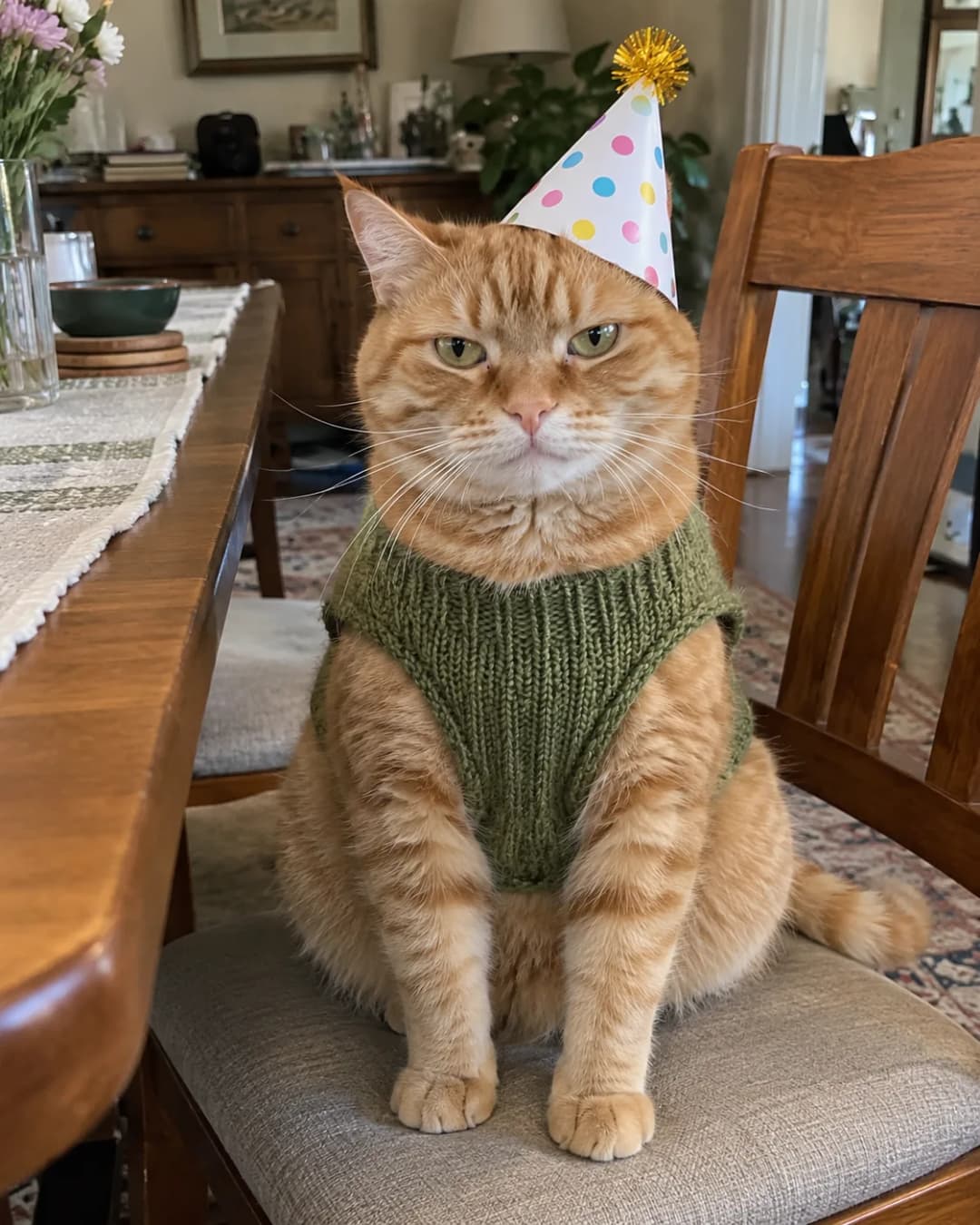
These are actual AI runs made from the pictured inputs. Recognizable subject cues survived in all three results. The selected rooms also changed, while the building approach, stare and curtain close stayed consistent. These examples do not promise identical results from every photo.
 Real input
Example 01
Room choice
Grandma’s Living Room
What this run shows
The pink rollers, stern expression and leopard-print robe remain recognizable while the scene becomes the full window-peeper sequence.
 Real input
Example 02
Room choice
Secret CEO Meeting
What this run shows
The suit and dinosaur-trouser gag remain identifiable, while the selected room turns the joke into a late-night executive meeting.
 Real input
Example 03
Room choice
Party After Everyone Left
What this run shows
The orange cat and green sweater stay recognizable, and the balloons make the empty-party room visibly different from both human examples.
04 · Control and limits
You choose who appears, the room idea and output quality. The model interprets the photo, so it cannot promise pixel-perfect identity, clothing, hands, food or room geometry.
You choose the media that fills the current slots and can inspect the fixed preview before export. The template does not turn its locked scene into a fully custom story.
05 · Cost, privacy and failure risk
The AI route starts at $6.99 for the Standard Video pack and uses one-time packs. CapCut pricing and feature access must be checked in the current app; this page does not label it free.
Both routes require you to upload media. Use only photos and clips you have permission to use, and read the current provider terms before submitting sensitive material.
AI can drift from the source photo. A template can be missing, renamed or unavailable. Choose which uncertainty is easier for your post to absorb.
06 · How this comparison was made
Product details come from the current product contract. The input is one everyday photo of a consenting adult or a cat or dog. Controls include Person or Animal, Auto plus eight room ideas and Standard 480p or HD 720p. The output is a 14-second 9:16 MP4.
The CapCut side covers the observed Window Peeper template listing, not the full editor. We only state facts that can be checked without opening a user account. Media slots, music, availability and paid features remain live details rather than permanent facts.
For the visual sequence itself, we reviewed the three supplied TikTok references across the opening, middle and ending beats. Read the full trend breakdown or open the current CapCut listing.
07 · Questions
Each option suits a different job. Use Window Peeper AI for a new result from one authorized photo. Use CapCut when the available template preview is already the edit you want.
CapCut can be faster when the correct template is available and your media already fits its slots. The AI route reduces setup to one photo, but generation still takes processing time and the result needs review.
Window Peeper AI gives explicit Person or Animal, room and quality choices. A CapCut template gives precise control over which supplied media fills its fixed slots, but the template’s scene and timing are largely predetermined.
Window Peeper AI is designed to output the video with the trend audio. For CapCut, confirm the sound shown in the current template and check whether you can use it on the platform where you plan to post.
The AI workflow has a dedicated Animal choice and accepts one clear everyday photo of a cat or dog you are allowed to use. A CapCut template may also work with pet media, but the result depends on its current slots and fixed edit.
08 · Choose your route